Usage & billing
Usage & billing
Telenow meters every call, chat, and agent action per organization, settles each into a money charge, and shows you the running total in your chosen currency. This page covers the two account modes (prepaid credits vs. postpaid invoicing), the charge breakdown, top-ups, spend caps, and usage quotas — everything an org admin needs to run billing from the dashboard.
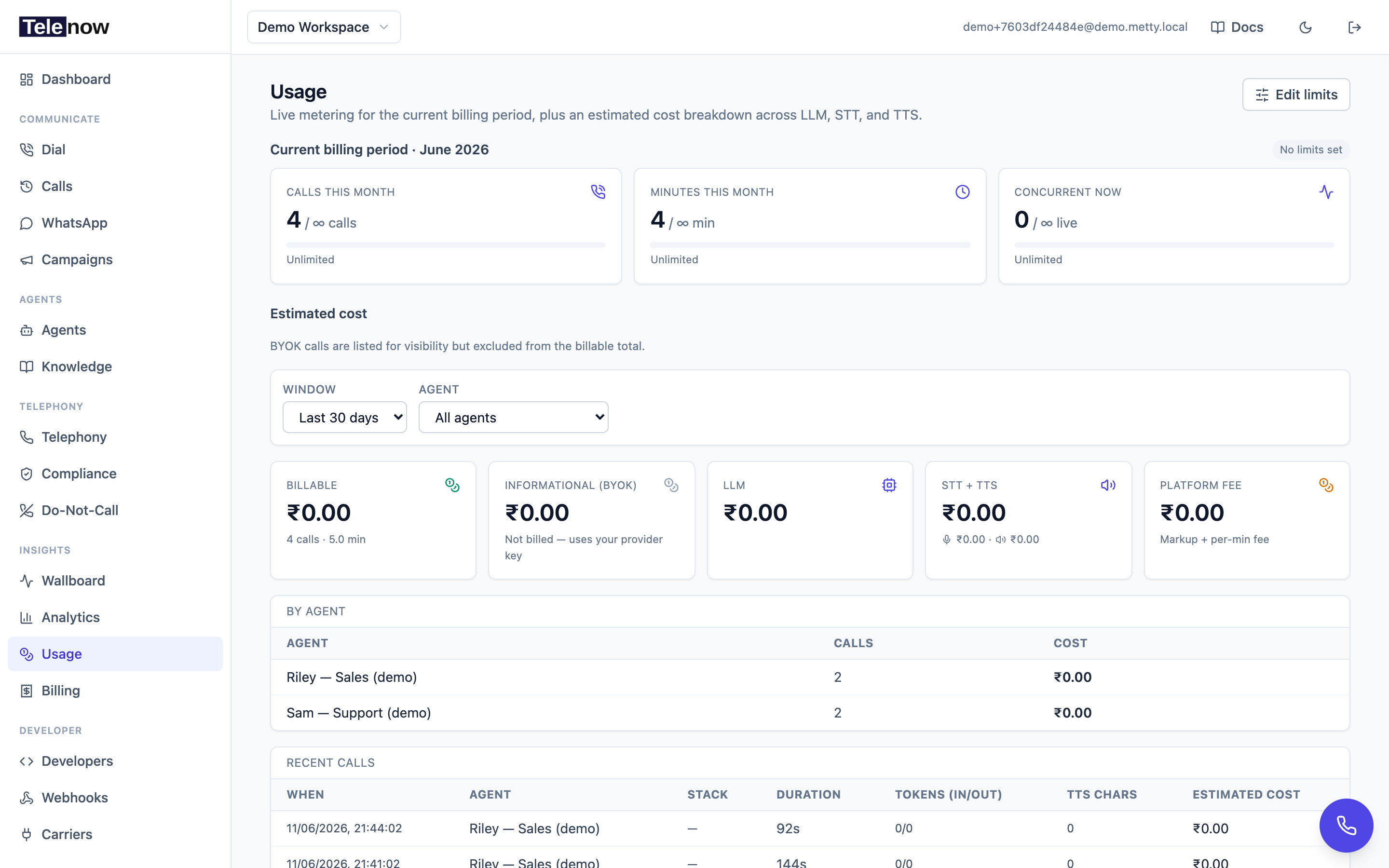
The Usage page — calls, minutes and live concurrency for the current period against your quota, plus an estimated cost breakdown by component (LLM / STT / TTS / telephony).
The credits / balance chip
Every page header carries a small wallet chip showing your account balance (owner/admin only — it quietly disappears for other roles). Click it to jump straight to the Billing page.
- Prepaid accounts show Credits and the remaining wallet balance. It turns amber when you hit zero.
- Postpaid accounts show Balance. A negative balance (outstanding spend) shows in red.
A suspended account always shows red.
Account modes: prepaid vs. postpaid
Your organization runs in one of two modes (set by the platform admin; new self-serve signups start prepaid):
| Mode | How it works | What blocks new calls |
|---|---|---|
| Prepaid | A credits wallet where 1 credit = ₹1 (converted to your currency). Every paid action — AI calls, manual softphone calls, chat, agent usage, and phone-number rentals/purchases — draws down the wallet. New self-serve orgs receive a welcome grant (default ₹100) automatically. | The wallet hitting zero. Calls are hard-gated: at a zero (or negative) balance, new calls and number purchases are refused with 403. |
| Postpaid | Usage accrues through the calendar month (IST) and is invoiced on the 2nd of the next month. The account is allowed to run negative until then. | Only an unpaid/overdue invoice that leads to suspension, or a configured monthly spend cap. |
You can see which mode you're in on the Billing page (the balance tile reads Credits for prepaid, Account balance for postpaid).
Buying credits (top-up)
Prepaid accounts buy credits to keep calling; postpaid accounts can also add funds to offset their balance. The button label adapts: Buy credits (prepaid) or Add funds (postpaid).
- Go to Billing in the sidebar.
- In the balance card, pick a quick amount (₹500, ₹1,000, ₹5,000) or type a custom amount.
- Click Pay — a Razorpay checkout opens.
- Once the payment is captured, the credit lands within a few moments (the wallet is updated by Razorpay's signed server callback, never from the browser).
Top-up range: ₹50 minimum to ₹10,00,000 maximum per top-up. Amounts step in ₹50 increments in the UI.
Online payment requires the platform to have configured a payment gateway. If it isn't configured you'll get a clear message — pay by bank/UPI and ask the platform admin to record the payment instead.
See the Topups API below to script this.
What you're charged for (the component breakdown)
Each call (and chat) is settled shortly after it ends into a row of component charges. The components are:
| Component | What it covers |
|---|---|
| LLM | The language model's input + output tokens (cached input tokens are priced separately and more cheaply). |
| STT | Speech-to-text minutes, priced per model. |
| TTS | Text-to-speech characters, priced per model. |
| Telephony | The carrier (PSTN) leg. Web calls have no telephony charge. |
| Platform AI | Cross-cutting AI the platform runs on your behalf (e.g. post-call summaries, knowledge embeddings for retrieval). |
| RAG / embedding | Embedding work for knowledge bases (shown when present). |
| Platform fee | The markup applied on top of provider costs. |
The platform fee is computed as:
platform_fee = fee_percent × Σ(component charges) + fee_per_min × billed_minutes
Both fee_percent and fee_per_min come from the catalog (and may be overridden per org by the platform admin). The same fee is folded into the live cost-per-minute estimate in the agent builder, so the number you see while designing an agent matches what a minute actually costs.
Chat is billed per turn, not per minute
Text conversations — WhatsApp, Instagram, the Chat API, and the web widget in chat mode — hold no line open. Somebody who reads your agent's reply and answers fourteen minutes later has cost you nothing in between, so a text session is not charged fee_per_min × minutes. Its platform fee is a block price instead:
chat_platform_fee = block_usd × turns ÷ block_turns
For example, at $10 per 300 turns, each turn costs $0.0333… and a 40-turn conversation pays $1.33. The percentage on component charges still applies, and your LLM token cost is billed exactly as it is for voice.
What counts as one turn
- One message from the person, answered by your agent, is one turn — no matter how many tools the agent had to call to answer it.
- Messages your agent sends on its own — the opening greeting, scheduled follow-ups, broadcasts, flow step openers — are never turns. Only a person's message can start one.
- A turn that failed and returned an apology is not billed.
- Three messages sent in quick succession are three turns if your agent answered each one. (The Chat API rejects a second message while a turn is still running, so it produces one.)
- Simulator runs are free. Dry runs against your agent never mint a turn.
Turn billing applies only once the platform has set a turn price; until then chat continues to bill on minutes. Your platform admin can also set a different block for your organisation, or keep you on per-minute chat billing. Each settled chat session shows its turn count and the block it was priced against on the call's Cost panel.
BYOK is informational-only
If an agent uses your own provider key (BYOK) for the LLM/STT/TTS, those components are metered for visibility but not billed by Telenow — your provider bills you directly. On the Usage page, BYOK calls appear in a separate Informational (BYOK) total and are excluded from the billable figure. BYOC telephony legs are treated the same way.
The Billing page
Billing (sidebar → Billing, owner/admin only) is your money view for the current period:
- Payable so far this period — the running total of settled charges (postpaid) since the period start, plus your billable-call count.
- Credits / Account balance — the wallet (prepaid) or running balance (postpaid).
- Buy credits / Add funds — the top-up card (when a gateway is configured).
- Monthly spend limit — a meter showing how much of your platform-set spend cap is consumed (turns amber at 70%, red at 90%). When the cap is reached, new calls stop until it's raised by the platform admin.
- Usage-type tiles — spend split across Manual (softphone) calls, AI agent calls, Chat sessions, Platform AI, Number rentals, Platform fee, and any Carrier adjustments.
- Per day — a bar chart of daily spend across the period.
Charges by agent
The Charges by agent section breaks the period's settled charges down per agent × call type (AI agent / Manual / Chat) with each money component (LLM, STT, TTS, Phone, Platform AI, RAG, Platform fee) and a row total — this is what's behind each "Call charge" ledger line. Calls that are still settling appear within a few minutes. (Telenow's internal vendor cost is never shown here; you only ever see your charge.)
Invoices (postpaid)
The Invoices section lists your invoice history. The first invoice is generated on the 1st covering the current period (prorated from your signup date) and is payable on the 2nd. INR invoices in issued/overdue status show a Pay now button that opens Razorpay checkout. Invoice statuses: draft, issued, paid, overdue, void.
Ledger
The Ledger shows recent entries — charges (debits), payments (credits), and adjustments — each with the running balance after it. Call charges, call adjustments, payments, and rentals all appear here.
Usage & quotas
The Usage page (sidebar → Usage) shows authoritative server-side metering for the current billing period — the calendar month in IST (the platform's billing timezone), exposed as a UTC instant in the API:
| Meter | What it shows |
|---|---|
| Calls this month | Billable calls so far vs. your monthly call limit. |
| Minutes this month | Connected talk minutes vs. your monthly minute limit. |
| Concurrent now | Live simultaneous calls right now vs. your concurrency cap. |
A meter with no limit set shows ∞. Each gauge turns amber near the limit and red at/over it.
Setting your limits
Owners and admins set quotas from Usage → Edit limits:
- Click Edit limits (top-right of the Usage page).
- Fill in any of:
- Monthly call limit — calls allowed per period.
- Monthly minute limit — minutes allowed per period.
- Max concurrent calls — simultaneous live calls.
- Leave a field blank for unlimited. A value of 0 hard-pauses that dimension.
- Toggle Enforce these limits off to meter without blocking calls (observe-only). When off, the Usage panel shows an "Observe-only — not enforced" badge.
- Click Save limits.
These limits are enforced at dial time, before any carrier is contacted, via PUT /api/orgs/{orgId}/usage/limits (owner/admin only). See Analytics & usage API.
How enforcement behaves
When an enforced limit is reached, new calls are refused — never silently dropped, and never billed:
- Concurrency cap →
429 Too Many Requests, with aRetry-Afterheader and a body carryingscope,cap,active,positionandretryAfter. This is transient: a slot frees the moment a live call ends. HonourRetry-After— each refused caller is given a different wait so a backlog spreads out instead of returning as one wave. - Monthly call / minute quota →
403 Forbidden. This is not transient: raise the limit in Usage settings or wait for the next billing cycle. - Spend cap or suspended account →
403 Forbidden(a billing gate that sits ahead of both the concurrency and quota checks, so a suspended account is told it is suspended rather than "at capacity").
Max concurrent callsis not the only ceiling. Two more apply that are set by your platform admin, not here: a per-number cap (default 2, the usual reason a burst of dials is refused) and a browser cap for web sessions (default 50). Thescopefield in the429tells you which one you hit. See Concurrency limits for the full picture and how to configure each.
The concurrency caps also bound anonymous public widget sessions, so public traffic can't run up your spend.
Cost estimates
Because each agent is assembled from LLM, STT, TTS, and telephony providers — each with its own per-minute price from the catalog — Telenow shows a live cost-per-minute estimate in the agent builder that already includes the platform fee. The Usage page also shows a client-side estimated cost per call and per agent from the call log; invoices use the real settled per-carrier charge, so the estimate and the invoice can differ slightly.
Currency
Set your workspace currency in Workplace → Organization (the default is INR). Prices across the dashboard — number search, cost estimates, usage, billing — are converted and formatted to that currency at the current rate. Invoices lock the FX rate at issue time.
Plan tiers (integrations)
Telenow supports plan tiers that gate certain integration capabilities. Tiers are admin-toggleable and OFF by default, so unless your platform admin has turned plans on, no tier limits apply to your account. See Integrations for what's gated when plans are enabled.
API
For building your own dashboards, alerts, or billing automations:
| Method | Path | Purpose |
|---|---|---|
GET | /api/orgs/{orgId}/usage | Current-period usage snapshot + configured limits |
PUT | /api/orgs/{orgId}/usage/limits | Set quotas + concurrency cap (owner/admin) |
GET | /api/orgs/{orgId}/billing/summary | Period payable, breakdown, per-day, account balance |
GET | /api/orgs/{orgId}/billing/breakdown | Charges by agent × call type |
GET | /api/orgs/{orgId}/billing/invoices | Invoice history with line items |
GET | /api/orgs/{orgId}/billing/ledger | Ledger entries, newest first — paged with ?limit= (max 200, default 50) and ?offset=; returns { "entries": [...], "total": N, "limit": N, "offset": N } |
POST | /api/orgs/{orgId}/billing/invoices/{invoiceId}/pay | Create a Razorpay order for an unpaid invoice |
POST | /api/orgs/{orgId}/billing/topup | Buy credits (prepaid) — body { "amountInr": 1000 }, range ₹50–₹10,00,000 |
Billing routes are owner/admin only (JWT). Usage metering can be read by any member; only owner/admin can change limits. Full reference: Analytics & usage API and Catalog & providers API.
Troubleshooting
- "Out of credits" when placing a call — your prepaid wallet is at zero. Top up on the Billing page.
- "Account suspended — new calls are blocked" — clear the outstanding invoice (or ask the platform admin to record a manual payment), then calls resume automatically once the payment posts.
429(withretryAfter) when dialing — you hit your concurrent-call cap. Wait for a live call to end, or raise Max concurrent calls in Usage → Edit limits.403"Monthly … limit reached" — you hit a monthly quota. Raise it in Usage → Edit limits or wait for the next cycle.- "Online payment isn't configured" — the platform hasn't set up a gateway. Pay by bank/UPI and ask the platform admin to record the payment.
- Estimate ≠ invoice — the Usage estimate uses the highest catalog rate for the carrier leg (it doesn't know which carrier ran each call); the invoice uses the real settled charge.
Related
- Analytics & usage API — programmatic usage, limits, and call analytics.
- Catalog & providers API — provider pricing that drives cost estimates.
- Analytics dashboard — call-volume and outcome reporting.
- Integrations — connectors and plan tiers.
- Call history and Post-call analysis.