Calls, recordings & insights
Calls, recordings & insights
Every finished conversation — phone, softphone, web chat, or a WhatsApp agent chat — is stored as a call with its transcript, duration, outcome, quality metrics, and (optionally) a recording. WhatsApp rows appear whenever an agent auto‑replies on a connected WhatsApp channel; the contact's number shows as the caller.
Call history
Calls in the sidebar lists every call. Filter by agent, channel (telephony / web chat / WhatsApp chat / softphone), call type (agent vs manual), status, date range, and caller number, sort the list, page through results, and export to CSV. Click any row for the full detail.
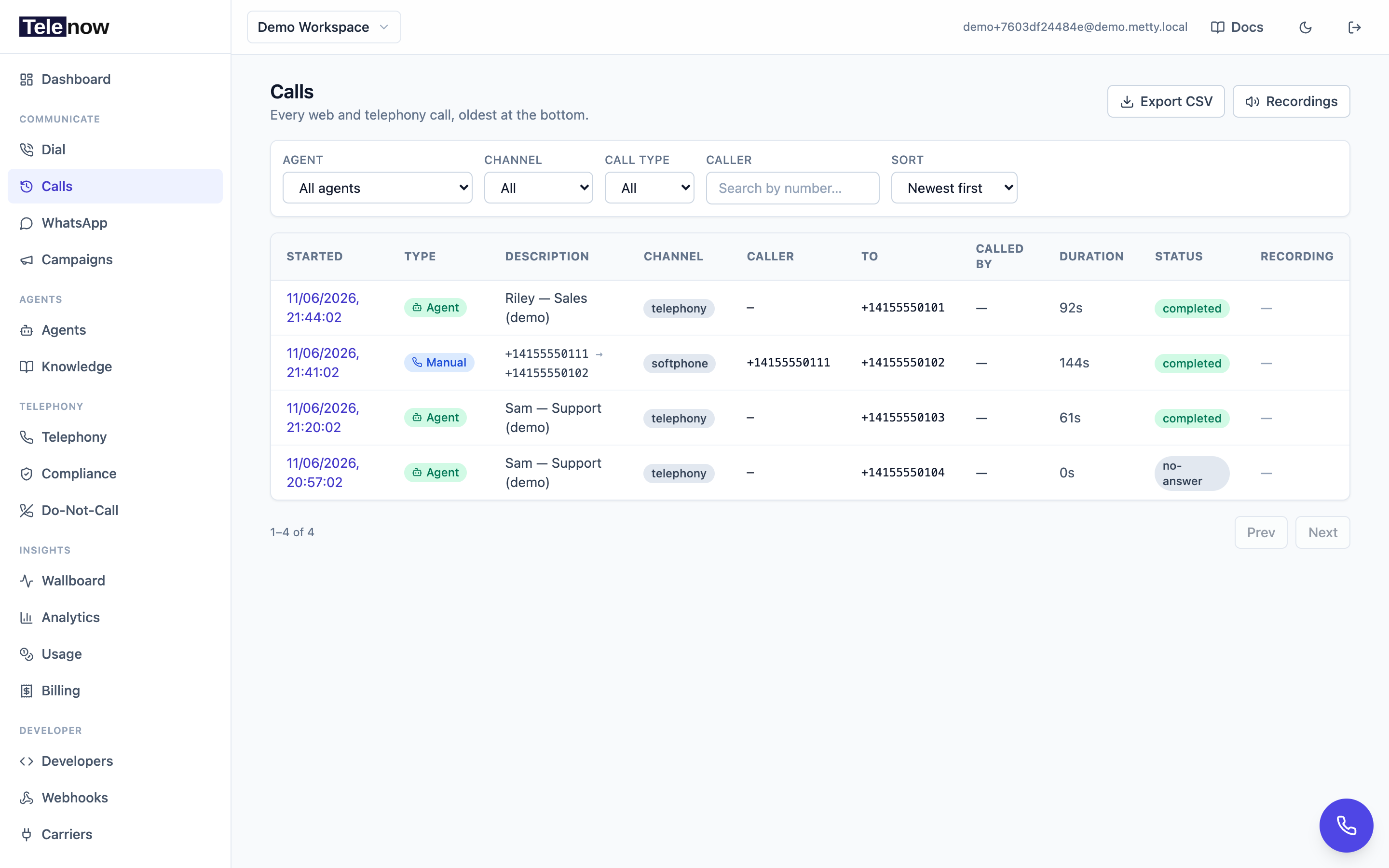
Call history — filter by agent, channel, call type or caller, export to CSV, and click any row for the full detail.
The CSV export includes, per call: id, start/end time, duration, status, call mode, agent, from/to numbers, carrier disposition, wrap‑up disposition, answered‑by, who initiated it, and average response latency. It uses the same filters as the list (no pagination) and is capped at 50,000 rows — narrow the date window if you hit the cap.
Call detail
A call's detail page is built top‑to‑bottom from the call record:
- Summary — agent, channel, status, from/to numbers, who placed it, the carrier disposition, the answering‑machine verdict, the exact models used on this call, and whether caller memory was recalled.
- AI insights / Post‑call analysis — on‑demand or automatic AI analysis (see below).
- Lead details — any info captured before a widget call (e.g. name, email).
- Context variables — the resolved context‑variable values used on the call.
- Cost breakdown — per‑component cost with metered quantities; an estimate until the settlement worker rates the call (~2–3 min after it ends), then the actuals. See Usage & billing.
- Call quality and Latency breakdown — see below.
- Conversation — the per‑turn transcript (caller and agent).
- Tool invocations — each tool call the agent made, with arguments, result, and latency.
- Turn timings — per‑turn response latency derived from message timestamps.
- Recording(s) — inline player(s); a transferred call shows two labeled parts.
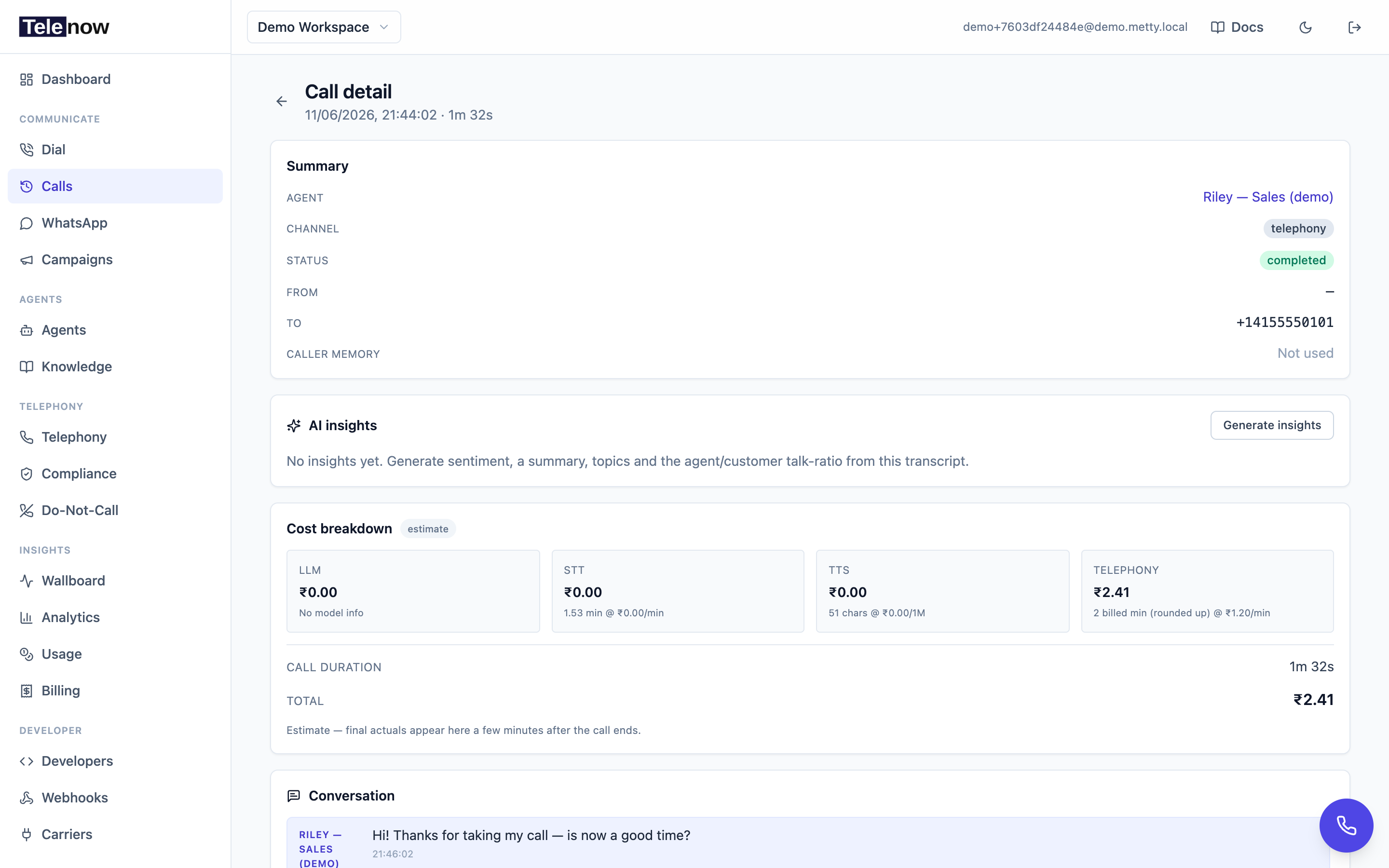
A call's detail page — summary (models used, caller memory), AI insights, cost breakdown with metered quantities, transcript, and the recording player.
Who placed the call
The Summary shows a Called by row when the call has an initiator:
- A dashboard dial (a softphone call or an agent test call) is attributed to the user — their full name, else email.
- A programmatic dial (over the API with an API key) is attributed to the API key's name and badged API.
- An inbound call has no initiator, so the row is omitted.
On the wire these are initiated_by_name and initiated_via ("user" | "api" | null).
Status vs disposition vs answered‑by
Three different fields describe a call's outcome — they answer different questions:
| Field | Question it answers | Values |
|---|---|---|
| Status | What's the session's lifecycle state? | active (in progress) · ended (the call is over — whether it connected or not) |
| Disposition | Did the call connect at all? (carrier‑reported) | answered · no-answer · busy · failed · null (until the carrier's status callback maps one) |
| Answered by | Did a person or a machine pick up? (AMD) | human · machine_start / machine_end_beep · null (when answering‑machine detection wasn't run) |
The carrier disposition is what drives campaign retry logic — no-answer / busy / failed can trigger a redial. The wrap‑up disposition (a softphone operator's own classification, set in the wrap‑up form) is separate again and never overwrites the carrier disposition.
Call quality
For calls with measured turns, the detail page shows a Call quality card:
| Metric | Meaning |
|---|---|
Avg response (resp_ms_avg) | Mean time from the caller finishing an utterance to the agent's first audio — the latency the agent controls. |
Worst response (resp_ms_max) | The slowest single turn. |
Audio gaps (audio_gap_count) | Inbound carrier audio frames that arrived >120 ms late — a proxy for jitter / packet loss / choppy audio. |
resp_samples (how many turns fed the average) is shown so a noisy single‑sample figure can be hidden. Under ~1.2 s reads as snappy; past ~2.5 s reads as laggy.
Latency breakdown
A separate Latency breakdown card shows where each turn's time goes (averaged over the call):
| Stage | Meaning |
|---|---|
STT (stt_ms_avg) | Speech end → transcript ready (the STT provider's endpointing + recognition). |
Listening pause (turn_hold_ms_avg) | Transcript ready → agent turn opens: the brief deliberate wait that makes sure the caller finished speaking before the agent replies. Shown on calls recorded after this metric shipped. |
LLM (llm_ms_avg) | Request → first token from the model. |
TTS (tts_ms_avg) | Request → first synthesized audio. |
Server (overall) (resp_ms_avg) | Final transcript → first audio (the sum the agent controls). |
Web ⇄ server (net_rtt_ms_avg) | Browser↔server WebSocket round‑trip — web calls only. On telephony this reads N/A because the carrier leg can't be measured server‑side. |
All quality and latency metrics are null when a call wasn't measured (legacy rows, never‑connected dials, or a manual leg with no turns).
Caller memory
The Summary's Caller memory row shows whether stored memory for this caller was recalled into the conversation. Used on this call means earlier‑call memory (with an approximate character count) was injected so the agent could recall the caller; Not used means the feature is off for this agent, the caller had no stored memory yet, or the caller couldn't be identified. See Caller memory.
Recordings
Recordings are stored per organization and reached from the call that produced them — open any row in Calls → History and play it on the call's detail page. Because audio is sensitive, downloads use a time‑limited signed URL rather than a public link:
- In the dashboard, the player and download fetch a fresh signed URL automatically.
- Over the API, request one with
GET /api/orgs/{orgId}/recordings/{id}/signed-url(valid 5 minutes).
Where recordings come from:
- Softphone / telephony calls are recorded server‑side (both legs mixed into one file), starting when the carrier answers.
- Browser web‑agent calls are mixed in the browser at HD quality and uploaded on hang‑up (with an 8 kHz μ‑law server fallback).
- A transferred call produces two recordings — the AI portion and the bridged human portion — both shown as labeled parts on the call detail.
When a recording is finalized, Telenow fires the recording.ready webhook with a signed URL — handy when a recording lands shortly after the call ends. Full shapes are in the Recordings API.
Transcripts
Transcripts are captured per turn during the call and persisted with the call record (so they survive the live session leaving memory). They're visible on the call detail page and can be delivered inline on the call.ended webhook when the endpoint opts in (see Webhook events). Recordings and transcripts can be exported (CSV + signed URLs) and deleted to satisfy data-subject access and erasure requests — see Data protection, GDPR & DPA.
Insights
From a call's detail page you can generate insights — an AI summary, sentiment, topics/keywords, and a deterministic agent‑vs‑customer talk‑ratio. Insights are computed on demand and cached on the call. For the same analysis automatically on every call — plus a disposition, custom extracted fields, a QA score, and coaching — enable post‑call analysis on the agent. When post‑call analysis has run, its richer card replaces the on‑demand insights card.
For trends across many calls — answered rate, disposition mix, sentiment over time — see Analytics.
API
| Method | Path | Purpose |
|---|---|---|
GET | /api/orgs/{orgId}/calls | List / filter / paginate calls |
GET | /api/orgs/{orgId}/calls/export | CSV export of the filtered history |
GET | /api/orgs/{orgId}/calls/{id} | Detail + transcript + recordings + stack |
GET | /api/orgs/{orgId}/calls/{id}/cost | Settled per‑call cost breakdown |
GET/POST | /api/orgs/{orgId}/calls/{id}/insights | Read / generate AI insights |
POST | /api/orgs/{orgId}/calls/{id}/wrapup | Set the operator wrap‑up outcome |
POST | /api/orgs/{orgId}/calls/{id}/listen | Live listen‑in ticket (owners/admins) |
Plus comments & follow‑ups under the same path. See the Sessions & calls API and Recordings API. To be notified when a call ends, subscribe to the call.ended webhook.