Interview Screening CRM
Candidates call in or join a web call, an AI agent runs the first-round screening, and every applicant, JD and scorecard lands in one dashboard.
Reviewed & approved · install free · connect your tools
Last updated 2026-07-27
Screenshots
About Interview Screening CRM
Interview Screening CRM
Give every applicant a code. They call in — or join from a browser. An AI agent runs the first-round interview. You read the scorecard.
A complete, no-backend Telenow app for teams that spend too many hours on first-round screens. Share one screening line with candidates, let the AI interviewer ask the questions you prepared for that specific candidate, and get a structured scorecard — with per-question answers and a go / no-go recommendation — in your dashboard before you've finished your coffee.
How it works
 HR adds a candidate  ──▶  app generates an interview code  ──▶  HR sends the invitation
                                                                        │
                                              ┌─────────────────────────┴───────────────────────┐
                                              ▼                                                 ▼
                                    candidate dials the                              candidate opens the
                                    screening number                                 web call link
                                              └─────────────────────────┬───────────────────────┘
                                                                        ▼
 Scorecard on the Screenings page  ◀──  AI agent verifies the code and interviews  ◀────────────┘
                │
                └──▶  workflow moves the candidate to "Screened" and copies the score onto their row
Two ways in, one interview. Telephony and web call run the same agent, the same questions and the same scorecard. On a web call there's no phone number attached to the conversation — which is exactly why the interview code is the primary identifier throughout.
Nothing to host. Every piece — the data store, the agent's tools, the dashboard, the automation and the application intake webhook — runs on Telenow's own runtime.
What you get
Seven dashboard pages
| Page | What it's for |
|---|---|
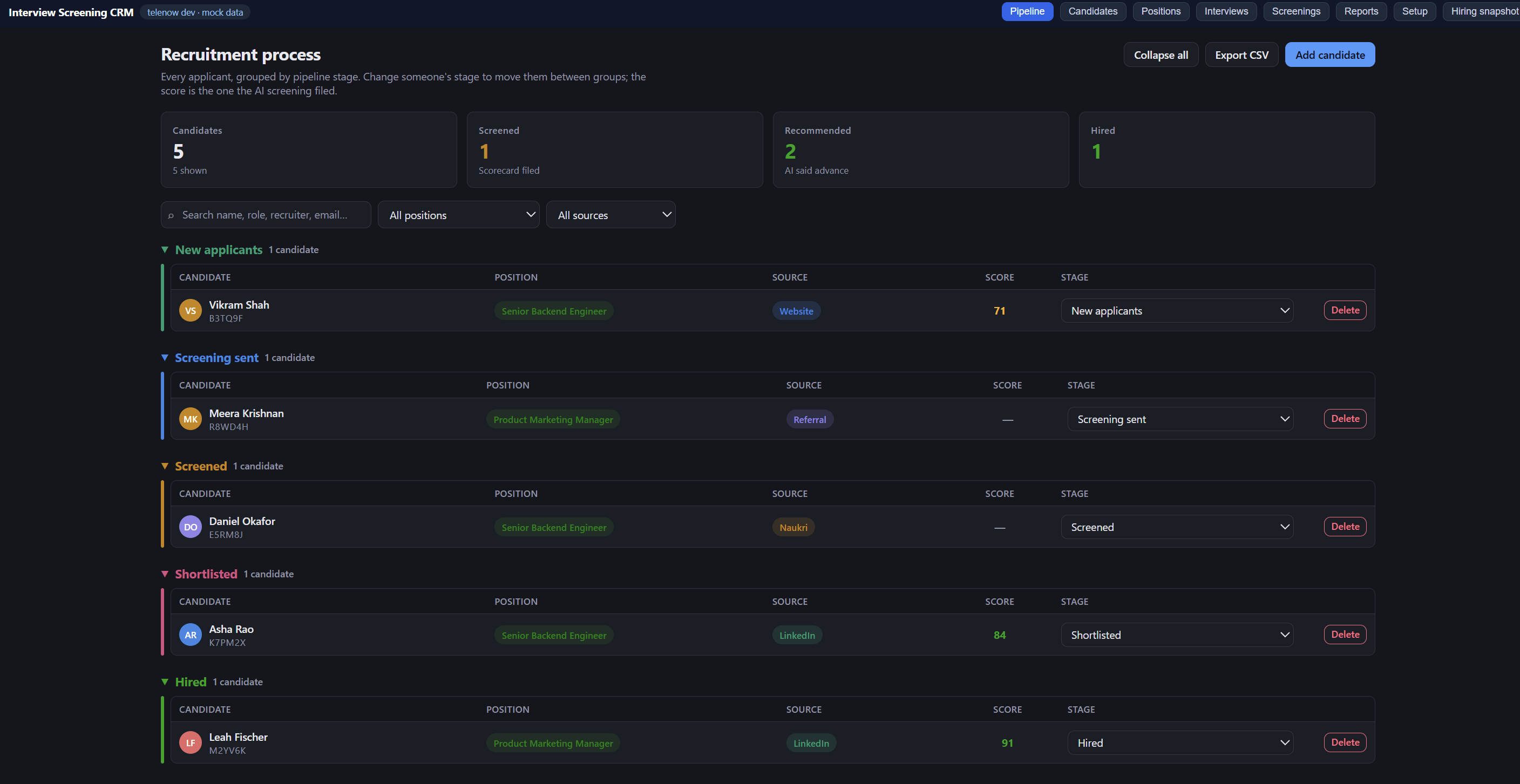
| Pipeline | The recruitment board. Candidates grouped by stage, with the screening score the agent filed and a stage select that moves them — the view most recruiters live in. Add a candidate in full detail from here, including the time their screening is booked for. |
| Candidates | The applicant workbench: sortable table and a full profile / résumé editor. Candidate information only. |
| Positions | Job requisitions and JD text — the JD is what the AI agent reads, and what question generation is grounded in. |
| Interviews | Schedule and invite the one AI screening: set its time, pick which agent runs the outbound call, edit the invitation (message or email), copy it, mark invited, or place the call now. |
| Screenings | Every AI scorecard: four competency scores, strengths, concerns, the full question-by-question transcript, and Shortlist / Reject buttons that move the candidate. |
| Reports | Funnel, source effectiveness, score distribution, screenings over time, position performance. |
| Setup | Readiness checklist, one-click agent creation, the careers-page webhook, and sample data. |
Plus a hiring snapshot widget that renders on the dashboard home.
One ready-made voice agent
One click in Setup builds a real, tool-bound agent in your org:
- Screening Interviewer — a flow agent: identify → arrival window → structured questions → logistics → candidate's questions → scorecard. Three global branches exit gracefully: the candidate wants to stop, their invitation has expired, or they have used up their attempts.
The same agent handles both directions — the candidate dialling in or joining the web call, and the recruiter's outbound "Call now" — so there is nothing to choose between.
Eight tools the agent can call mid-call
find_candidate · log_call_attempt · get_job_details · get_candidate_questions · register_candidate ·
record_answer · submit_screening · reschedule_screening
All declarative — they read and write the app's own data store directly. No server, no signing secrets, no webhook plumbing.
Automation that runs itself
screening-completedworkflow — when a scorecard is filed, moves the candidate to Screened and copies the overall score and recommendation onto their row. This is the only workflow, and it matches onscreening_code.application-intakeinbound hook — POST your careers-form submissions straight in and a candidate row is created, sitting at New for you to invite.
Setup, in order
-
Install the app and open Setup. The readiness checklist tells you exactly what's missing.
-
Fill in the settings (installed app → Settings): Company name, and a fallback screening number if you want one. That is all there is — the screening number and the web call link both belong to an agent and are set on the app's own Setup page (step 4), which is also where you pick the default agent.
-
Create a position on the Positions page and write the JD. Then, per candidate, open Interviews → Questions and generate the interview questions from the résumé and JD (on Telenow's own LLM, billed to your wallet) — or write them by hand. This is the step that matters most — the agent asks exactly these questions, in this order. "Load a starter set" gives you six solid role-agnostic ones to edit.
-
Create your agent from Setup. You'll be taken to the agent builder; the agent is already bound to this app's tools and knowledge base. Then give candidates a way to reach it — you do not need a phone number:
- Web call (no phone number required). In Telenow: Agents → your agent → Publish → turn on
Enable public link → Save. You get a
telenow.ai/p/…link that opens a call page in any browser, no login. Paste it into Web call link on the app's Setup page (step 3) — once per agent. From then on, every invitation that picks that agent fills its link in automatically, and switching agent on a candidate swaps the link with it. Leave the agent's access code off — candidates already identify themselves with their interview code, and an access code would block them. - Phone. Attach a number to the agent in Telenow, then type that number into Screening phone number on the app's Setup page — beside that agent's web call link.
Either route on its own is enough. The interview and the scorecard are identical whichever they use.
Telenow's app bridge hands an app an agent's id and name, but not its publish slug — reading that back would need an org-wide API key. Pasting the link once per agent keeps the app inside the permissions it actually asks for.
- Web call (no phone number required). In Telenow: Agents → your agent → Publish → turn on
Enable public link → Save. You get a
-
Add a candidate (or wire up the webhook), then open Interviews → Invitation and press Create interview link. That mints a
telenow.ai/l/…link for that one person and writes the message for you. See below for what makes it different from the shared page above.
One link, and nothing in it
Create interview link on a candidate's Invitation tab mints a personal, single-use link. That link is the only thing the candidate ever receives — there is no interview code, no PIN, nothing to type and nothing to read out. They open it and the interview starts.
The URL carries no data at all. Instead, at the moment the link is made, the app uploads the whole briefing to the platform and stores it against the token:
| Uploaded to the interviewer | Where it comes from |
|---|---|
| First name — what it greets them by | split from name, honorifics stripped |
| Full name, email, phone, city | the candidate record |
| Role, job description, must-have and nice-to-have skills | the position |
| Their résumé | resume_text on the candidate |
| The exact approved questions, in order, with competencies | Interviews → Questions |
So the interview opens with "Hi Kundan — thanks for joining", not "hello there, can I take your name?".
Before you send anything, the Invitation tab shows What the interviewer will know — every one of the rows above, with what the agent will actually do with it. A missing name blocks the link outright (there is nothing to greet them by); everything else warns and tells you what the fallback will be. This matters because a briefed interview fails silently — the link works, the agent talks, and only the scorecard reveals it was working from an empty question list.
For a whole round at once: filter the Interviews list to a role, and Create N links mints one for every candidate who has none. It leaves anyone already holding a link alone, skips completed screenings, and names every candidate it had to skip and why.
When the candidate opens the link, the platform hands the agent that briefing. So the interview begins already
knowing who has arrived and what to ask — it never calls find_candidate, get_job_details or
get_candidate_questions, and it is explicitly forbidden from asking for a code, a reference or a PIN.
Four consequences worth knowing:
- The link is the whole credential. An unguessable token that works once, the same model as a
password-reset link. Someone the candidate forwards it to could sit the interview in their place. That is
deliberate: a real candidate locked out of their own interview because they could not produce a code is a
worse outcome, and
singleUsebounds the exposure. Revoke a link if you suspect it has gone astray. - The briefing is a snapshot. Editing the questions afterwards does not change a link already sent — which is what you want when every candidate for a role must be scored on comparable answers. The rail says so when it happens; Rebuild link publishes the edits and kills the old link.
screening_codestill exists, but nobody sees it. It is now purely internal — the key question rows are tagged with, and the key a filed scorecard comes back by. It is created automatically the first time anything needs one. You may still paste one into the Interviews search to find a person.- The shared route still works. Phone-in candidates, and any workspace whose platform has not enabled
links, fall through to the agent's tool lookups exactly as before — the app feature-detects and hides the
section rather than failing. On that route the code is load-bearing, so it reappears there and only there.
links:read/links:writeare the scopes involved; the bundled CLI (SDK 0.4.0) does not know them yet and warns onvalidate, which is expected.
Wiring your careers page
POST https://api.telenow.ai/webhooks/app/<installationId>/application-intake?token=<install signing secret>
Content-Type: application/json

{ "name": "…", "email": "…", "phone": "…", "position": "Senior Backend Engineer",
  "source": "website", "linkedin": "…", "company": "…", "title": "…",
  "experience_years": 4, "location": "…", "resume_url": "…", "message": "…" }
Find installationId and the signing secret on the installed app's page in your dashboard. Candidates are
upserted by phone, so a resubmission updates rather than duplicates.
Data model
| Object | Holds |
|---|---|
position | Requisition, JD text, skills, hiring manager, status |
candidate | Applicant profile, interview code, stage, screening_at (the booked slot), invite_expires_at, call_attempts, screening_agent_id (which agent runs their screening), résumé text, last score |
screening_question | Per-candidate interview questions (tagged with the interview code): text, competency, order, weight, ideal answer, generated_by |
screening | The AI scorecard: four competency scores, overall, recommendation, strengths, concerns, summary, logistics |
screening_answer | One row per question asked, with the candidate's answer and a 0–10 rating |
agent_link | Per agent: the number candidates dial, the web call page they open, and which agent is the default |
Résumés and JDs are text, on purpose
You paste the résumé and the job description in as text. That's not a shortcut — it's the only form the AI agent can actually read and reason over mid-call. A PDF sitting in storage is invisible to the interviewer; pasted text is what lets it ask "you mentioned migrating a monolith — what was the rollback plan?"
Recruiters can also store a link to the CV (resume_url) for their own reference, and your careers form
can supply one through the intake webhook.
Want PDF or Word upload with automatic text extraction? That's a customisation — ask Telenow and it can be
added for your organisation. This version deliberately ships without blob storage or the files:* scopes.
One conversation, voice-only, by design
The screening is the interview. There is no second, separate round to book: this app schedules exactly one
thing, candidate.screening_at, the time that screening is booked for. Leave it blank and the candidate joins
whenever they like. If they need a different time, the agent calls reschedule_screening and that same
screening moves — it never books them a second one.
Telenow orchestrates voice, so the only thing this CRM offers is what it can actually run: a phone call or a web call. There is deliberately no on-site or video option and no round/mode dropdown. A control that lets a recruiter book an on-site round is a promise to a candidate that nothing in the system keeps — so it isn't there. The bundled agent is instructed the same way: never offer or imply an in-person meeting, and hand anything beyond the screening back to the recruiter.
Fairness
The bundled agents are instructed — in the system prompt, in the flow node prompts, and in the knowledge base — never to ask about or score on age, marital or family status, pregnancy, religion, caste, ethnicity, national origin, disability or health. They're also told that confidence, accent and fluency are not competence. The knowledge base ships a "Fair interviewing rules" document that's attached to every agent this app creates.
The agent does not make hiring decisions. It scores, it recommends, and a human presses Advance or Reject.
Limits worth knowing
- List views read up to 500 rows per object type — the Pipeline and Candidates pages tell you when they hit the cap, and the filters narrow it.
- The agent's
get_candidate_questionsreturns at most 50 questions per candidate. That's more than any screen needs. - Data store: 100,000 rows per org across all types. Résumé and JD text count toward it, so very long pastes are stored but there's no reason to paste a whole portfolio.
Licence
Ships as-is for Telenow organisations. Edit the manifest and the UI freely — it's your hiring process.
SCREENING_INTERVIEW_CRM
Ready-made agents it ships
Runs the whole screening: verifies the candidate, asks the questions you set on the position, scores each answer and files the scorecard.
Runs the Qwipo Field Sales Executive first round as Navin: verifies the interview code, checks the FMCG hard gates, interviews in English, Telugu or Hindi, scores five categories and files the scorecard.
What your agents can do with it
Look up an applicant who has joined their screening interview. ONLY needed when the session arrived with no briefing — a candidate who opened their personal interview link is already identified and must not be looked up. Match on the email or the phone number: candidates are sent a link and nothing else, so they have no code to give you and must never be asked for one. A screening_code, if the session happens to carry one, is the fastest exact match — but it is an internal reference, not something the candidate knows. Returns their name, the position they applied for, their current stage, and resume_text — the résumé the recruiter pasted in, which you can question them on. It also returns invite_expires_at — the date the hiring team's invitation runs out. Treat the invitation as lapsed once that date has passed. It also returns call_attempts — how many times this candidate has already reached you.
Record that this candidate has reached you once more. Call this ONCE, immediately after find_candidate identifies them, before anything else. Take the call_attempts number find_candidate returned (treat a missing one as 0), add 1, and pass the result. This is how the hiring team sees someone who keeps starting the interview and hanging up.
Fetch the job description, required skills, location and compensation band for a role. Call this whenever the candidate asks anything about the job, and ALSO before writing your own questions when the candidate has no prepared questions — the description and the must-have skills are what those questions must be grounded in. Never invent job details.
Fetch the questions the hiring team prepared for THIS candidate — generated from their résumé and the job description on the Interviews page, or written there by hand. Call this once, right after identifying the candidate, passing the interview code find_candidate returned and active=true. If it returns questions, ask them sorted by their 'order' number ascending, one at a time — never one prepared for a different candidate. If it returns nothing, write the questions yourself from the job description and the résumé, exactly as your instructions describe, and say so on the scorecard.
Create an applicant record for someone reaching you with no interview code — a cold or referral applicant. Ask for their name, their email and the role first, then invent an internal reference for them. Do NOT read that reference out — candidates are never given one, and telling them one implies they will need it later. Use this ONLY for someone the hiring team has never invited — a cold or referred applicant. Never use it for someone whose code did not match or whose invitation has expired: only the recruiter can reissue an invitation.
Save the candidate's answer to ONE screening question, immediately after they finish answering it. Call this once per question — do not batch them up until the end of the call.
Submit the final scorecard at the very end of the screening call. Call this exactly once, after you have asked every question and collected the logistics answers. Scores are 0-100.
Data it manages
Permissions it requests
Apps run inside your workspace under least-privilege scopes you can see up front. This app asks for:
objects:positionobjects:candidateobjects:screeningobjects:screening_questionobjects:screening_answerobjects:agent_linkagents:readcalls:initiatecalls:readwhatsapp:sendsoftphone:dialai:llmlinks:readlinks:writefiles:readfiles:writeWhat's new in v2.18.0
Changelog
2.18.0
The code is gone as a join key. Résumés upload as files. The reference app's scoring path does not work.
The audit finding that changed the plan
Recruitment_CRM was the reference for "no code anywhere", and its inbound half — links.mint with the
whole briefing in context.variables — is sound and is what this app already copies. Its outbound half
is broken. Its three call.* workflows match interview rows on session_id, and nothing in its
4305-line App.tsx ever writes that field: session_id appears four times (one type declaration, one
comment, two reads) and zero times in any write. Every real interview row there has session_id = null,
all three workflows match nothing, and only demo-seeded rows show a score.
So this release does not adopt the toolless postCallAnalysis path. submit_screening demonstrably
works here today; it is re-keyed, not replaced.
candidate_id replaces screening_code — additively
- New declared
candidate_idfield oncandidate,screening_questionandscreening_answer, mirroring the row's own id. It has to exist as data: a declarativeobject.updatehandler rejects amatchnaming a field the object does not declare, and there is noidspecial case. - Written at candidate creation through a new
createCandidate()used by all four creation paths (manual add, Pipeline quick-add, CSV import, sample seeding), and lazily byensureCandidateId()on every path that is about to depend on it. Not by a one-shot sweep —data.listcaps at 500 with no offset, so a backfill can never be proven complete. - The briefing carries both keys, and
record_answer/submit_screeningaccept both. Agent templates deploy separately from the app, so a live agent may still be filing under the old key for a while; a scorecard filed under a key nothing reads is a candidate who looks like they never showed up. screening-completedgained a second workflow step rather than having its match swapped — one per key, whichever matches wins.- Every read is a union, never a fallback:
listByCandidate()queries both keys and de-duplicates on record id. The obvious "look up by id, fall back to the code" version hides rows the moment tagging is partial, and tagging is always partial for a while.linkCandidate()now tries candidate_id → code → phone, and the Screenings answer lookup queries all three of id, code and session. screening_codeis still declared and still read. It is not dropped until the data shows the migration is complete, which cannot be established from a capped list.
Résumé upload
- New
ui/lib/resume.ts:files.putto store,files.extractto read the text,files.getto download. Newfiles:read/files:writescopes andresume_path/resume_filename/resume_uploaded_at. - Capability is probed with a real round-trip, not a
typeof.typeof tn.files.put === 'function'is always true —filesis in the 0.4.0 typings and the dev mock implements it. What it cannot see is a missing scope, which fails at call time. Onefiles.list('resumes/')decides whether the control renders. - The blob is never lost to an extraction failure.
files.putsucceeding means the recruiter has a downloadable résumé on the record; every failure past that point is reported through a note instead of a rejection. Path, filename and text commit in one patch, so a row can never claim a résumé the briefing does not carry. - A scanned PDF is a reported outcome, not a silent empty string. Under 60 extractable words is treated as unusable and says so; zero words says "almost certainly a scan". An unexpected response shape is reported differently, because telling a recruiter "this looks like a scan" when the platform actually returned something malformed sends them to fix the wrong thing.
.txt/.mdare decoded in the browser before any upload is attempted, so they work with no extraction and even with no file storage.- Fixed: the scan warning was being erased in the same frame it appeared — the upload patches
resume_text, which re-ran the re-seed effect that cleared it. It now clears only when the modal moves to a different candidate. - Removed the generic "contact Telenow to add résumé parsing" panel from the Résumé tab. It sat directly under a working upload control and contradicted it.
Known-unverified
links.mint, links.list, links.revoke and files.extract are all absent from SDK 0.4.0's typings and
have never been observed working on this workspace — everything above was verified against stubs.
Each has a declared fallback, and none of them throws when missing. Confirming them on a live install is
the last step before this is demo-safe.
2.17.0
"Hi Kundan" — and you can see it will say that before you send
Three things: the agent greets by first name, the interviewer can verify what the agent will know before anything goes out, and a whole round can be linked in one action.
It opens with their name
- New
candidate_first_namevariable, split in the app rather than left to the model — a résumé-sourced name is often "Dr. Priya Nair", and "Hi Dr" is worse than no name at all. Honorifics are stripped (mr/mrs/ms/miss/dr/prof/shri/smt/sri); "Kundan Kumar" greets as Kundan. - The opener is set on both
openerandagentMsgwithfirstResponse: "agent". The two spellings exist across platform builds and the app cannot see which the live dashboard reads — setting both means whichever it picks is the personalised one, and they cannot disagree. - The prompt and the
identifyflow node both instruct greeting by first name, so even if a build failed to substitute the literal opener, the model's next breath uses the name. It is told never to open with "hello there", never to ask who it is speaking to, and never to ask a candidate to confirm their own name.
You can see what it will know
- New "What the interviewer will know" panel on the Invitation tab, checked before minting: greeting, role, job description, résumé and questions — each with what the agent will actually do. "The agent opens with 'Hi Asha'." "613 characters uploaded — the agent questions them on what it actually says."
- A briefed interview fails silently: the link works, the agent talks, and only the scorecard reveals it was working from an empty question list. There is no run-time error to catch, so the check happens at the one moment a human is looking.
- No name blocks the mint — that is the one thing the agent cannot work around, and it is enforced in
mintInterviewLinkas well as the button, so a bulk run cannot slip past it. Everything else warns and names the fallback instead of standing in the way.
One action for a whole round
- New bulk card on Interviews: Create N links for everyone in the filtered list who has none. Filter to a role, or to "Not started", and the button means exactly what the table shows.
- Never re-mints for someone who already holds a link — that invalidates something already sent, so it stays a per-candidate decision. Skips completed screenings.
- Runs sequentially, not
Promise.all: fifty concurrent mint-plus-write chains is how a rate limit turns a half-finished round into a mystery. One failure never abandons the rest — every skipped candidate is listed by name with the reason.
Also: .isc-sr-only utility so the readiness ticks announce "ready" / "warning" / "blocked" rather than an
unlabelled glyph.
2.16.0
The code is gone. The candidate gets a link and nothing else.
2.15.0 kept the interview code as the link's unlock. This removes it from the candidate's world entirely: they are sent one URL, they open it, the interview starts. Nothing to enter, nothing to remember, nothing to read out — and nothing they can fail to produce.
- No access code on the minted link. The unguessable single-use token is the whole credential, the same
model as a password-reset link. The trade is stated plainly: someone the candidate forwards the link to could
sit the interview in their place. That is the price of never turning a real candidate away at the door of
their own interview, and
singleUsebounds it. screening_codeis now an internal reference. It still exists — it is how question rows are tagged and how a filed scorecard finds its way back to a candidate — but nobody sees it, says it, or creates it. It is minted on demand the first time anything needs one (ensureReference), so a candidate who arrived from the careers-page webhook can be invited without a single preparatory click.- No more "Generate interview code" / "New code". The rail leads with the link. Revoke replaces code rotation as the way to withdraw an invitation, and Rebuild link republishes edited questions.
- The agent is forbidden from asking. A hard rule at the top of "RULES YOU DO NOT BREAK", plus rewrites
through the prompt, the flow nodes, and the
find_candidate/register_candidatetool descriptions. Where it genuinely cannot identify someone (a cold phone-in), it asks for their email, not a code. It no longer reads a reference back to anyone it registers. - Invitations carry the link alone. No code line in the message, the email, or the branded card — and the screening phone number is no longer offered beside a personal link, because that route would need the code back and the candidate would have been handed two doors, one of which asks for something the other never does. Someone who dials the number anyway is still handled; it is simply not advertised.
- Interviews table shows Interview link: Created / Not created instead of the code. Search still matches the reference (paste one from a scorecard and find the person), and now matches email too.
- The questions tab no longer blocks. Writing or generating the first question mints the reference itself instead of sending the recruiter away to press a button.
- Copy corrected across Candidates, Pipeline, Reports, Screenings and Setup, plus the agent's published-page greeting, which no longer tells candidates to have a code ready.
2.15.0
One link, and everything else uploaded to the agent
Adopts the Recruitment CRM's model: the candidate is sent a personal, single-use telenow.ai/l/… link that
carries no data in the URL. Everything the interview needs is uploaded at mint time and stored server-side
against the token — name, role, JD, must-haves, résumé, and the exact approved questions in order. The platform
hands that briefing to the agent the moment the link is opened.
This removes the problem 2.11 → 2.14 kept patching around. The old shared /p/<slug> page told the agent
nothing, so it had to work out who had arrived: find_candidate on a code that rotates, or an email, or a
phone; then get_job_details; then get_candidate_questions. Three round-trips before the first question,
each able to come back empty. A briefed session makes all three unnecessary.
- New:
Create interview linkon Interviews → Invitation. Mints the link, stores it on the candidate, and revokes the previous one — in that order, so a failed mint never leaves a candidate with nothing and a successful one never leaves two live links. - Agent rewritten with two paths. When
{questions}arrives filled in the agent is briefed: it greets by name, confirms the role, and runs the list — no lookup tools, no code read-out, no expiry check (a link that opened had not expired). When it is empty — a phone call, or a workspace still on the shared page — it falls through to the tool path, unchanged.record_answerandsubmit_screeningstill run on both. - The snapshot is deliberate. Editing questions does not alter a link already sent, so candidates for one role are scored on comparable answers. The rail flags a stale briefing and offers Rebuild link.
- Rotating the code now kills the link and clears it. The code was baked in as the link's unlock, so leaving it would hand the candidate a link their new code cannot open.
Call nowsends the same briefing, built by the same function, so an outbound call and a link can never describe different interviews.- Invitation copy branches on which route it is: a personal link's code unlocks the page rather than being read aloud, and where a phone number is also offered the message says both.
- Scopes: added
links:read/links:write. The bundled CLI (SDK 0.4.0) does not know them yet and warns onvalidate— expected, same as theaigateway before it.linksis feature-detected at runtime: without it the section is hidden and the app behaves exactly as 2.14.1 did. - Candidate fields:
invite_link_url,invite_link_id,invite_link_expires_at,invite_link_minted_at.
2.14.1
Model picker parity with the Live Assist reference
- Corrected the AI catalog
latencytype (it's{ ms, tier }, not a string) and added a speed hint (· fast/· moderate/· slower · most capable) to each catalogued model in the picker, matching how the Live Assist app annotates models. No behavior change to generation itself.
2.14.0
AI question generation fixed (the 422)
- Root cause: Telenow's AI gateway (
ai.llm) is billed per call-session and requires a realsession_idthat exists for the org. The Setup page has no session, and the app was sending a made-up string assessionId— which the gateway can't parse → HTTP 422. Even omitting it or sending a random UUID fails (the gateway 400s on an unknown session). The platform has no session-less app-AI path. - Fix: generation now anchors the (tiny) AI charge to the org's most-recent call — a call's
idis exactly thesessions.idthe gateway validates against. Added thecalls:readscope and aresolveBillingSession()helper that readscalls.history()and picks the newest call. - Caveat by design: the workspace needs at least one call before AI generation works (the charge attaches to that call). With zero calls, generation shows a clear message to make a call first or add questions by hand. Everything degrades to manual entry, never a raw status code.
2.13.1
AI request hygiene
- Stopped sending a fabricated non-UUID
sessionIdtoai.llm(the direct cause of the 422), made the augmentedsessionIdtype optional, and added a specific, actionable message for 422/session errors. (Superseded by 2.14.0, which supplies a real session.)
2.13.0
Agent web link auto-fills when you pick an agent
- In Setup → routes, choosing an agent now auto-fills its public web-call link instead of
requiring a manual paste. It reads the link two ways, best-effort: (1) straight off the agent
object if the platform includes it (
publicUrl/ a/p/<slug>share page), then (2) an async bridge lookup (agents.public()-style), mirroring how this app already feature-detects the undocumentedaibridge. If neither is exposed by the running platform, the field stays a normal manual input — no regression — and never clobbers a link you've typed.
2.12.0
find_candidate identifies by email/phone, not just the rotating code
- Root cause of the empty
find_candidateresults on web calls: the web call passescandidate_email/candidate_phone(and name/city) but notscreening_code, while the 2.11 prompt only auto-identified from a passed code or the telephony caller number — so it fell through to asking, and the code being read aloud was often a rotated/stale value. - Both agents now identify by the first of
{screening_code}→{candidate_email}→{candidate_phone}that is filled in. Email and phone don't rotate, so they're the reliable way in; the code is tried first only because it's the fastest exact match. Telephony (caller number) and the ask-for-code fallback are unchanged.
2.11.0
Web calls identify silently — no code read-out
- Both agents (Screening Interviewer + Qwipo FSE) now identify the candidate from context
passed into the call instead of asking them to read a screening code. Order: (A) if a
screening_codewas passed in (invite link / recruiter-started call) → look up + greet by name, no code asked; (B) phone call → identify by the caller's number; (C) only a bare web link with no context falls back to asking. Each agent declares optional context variables (screening_code,candidate_name,position_title,candidate_email,candidate_phone,candidate_language,candidate_city), and opens in the passed language when set. - Call now passes the full candidate record (code, name, role, email, phone, city) so outbound and dashboard-started web calls resolve the candidate and question them off their résumé with no code prompt. Telephony is unchanged (caller number identifies).
- Note: a self-serve invite link a candidate opens themselves can only be made fully silent with a per-candidate link (a client token), which a declarative app can't mint — those still fall back to asking for the code (path C).
2.10.1
AI question generation hardened
- Failures now surface a clear, actionable message instead of a raw error: an empty/negative
Telenow wallet (the #1 cause — the gateway bills the wallet), a missing
ai:llmscope, rate-limiting, or an unavailable model are each named specifically, and everything still degrades to "add questions by hand". - Resilient response parsing (handles any gateway response shape) plus one automatic retry with a stricter JSON re-ask when the model wraps its output in prose.
- Feature-detects the AI gateway (
getTelenow().ai) before calling, so the dev preview and any older dashboard fail gracefully rather than throwing an opaque error.
2.10.0
AI question generation moved onto the native bridge
- Question generation now calls the platform AI gateway directly through
getTelenow().ai.llm()under the app'sai:llmscope — no app key to mint or paste. The old App API key for AI question generation setting is gone, and so is thehttp:api.telenow.aiscope it only existed to reach. - The Questions panel gained a model picker: three speed tiers (Fast / Balanced / Smart)
plus every model in your org's catalogue, fetched live from
ai.models(). Balanced is the default, and the picker degrades to tiers-only cleanly when the catalogue is unavailable (e.g. the dev preview).
No more booked screening time
- The screening time / appointment slot is gone end to end — the
screening_atfield, the date-time pickers on Interviews and Pipeline, the agent's arrival-window logic, and thereschedule_screeningtool. A candidate now joins whenever they like; the invitation window is the whole scheduling model. The Interviews modal tab is now Invitation, and Reports shows Invited where it used to show "Screenings booked".
Invitation expiry in hours
- The Invitation expires control is now in hours: presets from 1 hour to 72 hours, plus a Custom row to type any number of hours. Expiry counts from now — there is no slot to anchor it to any more.
Test a real call right after deploy
- The Candidates empty state gained a Create sample candidates button. It writes a couple of
ready-to-call candidates (with freshly generated interview codes) into the live (app, org)
store through the same bridge the agent reads — the production-safe stand-in for the dev seed,
which never leaves local. Read one of the codes on a call to confirm
find_candidateworks end to end, then delete the samples from the Candidates page.
2.9.0
Questions belong to the candidate now
- The candidate modal on Interviews has two tabs — Scheduling and Questions. Scheduling keeps the interview code, time, expiry, the Message/Email invitation (copy, mark as invited, WhatsApp) and the outbound buttons. Questions is the interview itself: write questions by hand, or press Generate from résumé + JD and Telenow's own LLM drafts them from the résumé pasted on the candidate and the JD on their position. Every question stays editable — text, competency, weight, an optional ideal answer the scoring reads, order, paused or active — the same editor the position bank used to have, now per candidate.
- Generation runs on Telenow's AI gateway and is billed to your Telenow wallet, like call minutes. One new setting carries it: App API key for AI question generation — mint an app API key in the dashboard and paste it in. No key, no charge; the card tells you exactly where to get one.
- The per-role question bank is gone. Positions is the requisition and its JD now — the JD the agent
reads, and the raw material generation grounds itself in. The interviewer asks the candidate's prepared
questions (new
get_candidate_questionstool, fetched by interview code the moment the candidate reads it out), and when there are none it writes its own from the JD and résumé and says so on the scorecard. - The Screening agent picker left the Interviews modal — the agent, its number and its web call link are configured once in Setup. A per-candidate agent chosen before this change is still honoured.
"Screening code" is now "interview code"
- Every label, invitation, tooltip and spoken line — both agents ask for the interview code and the invitation says Your interview code. Purely a naming change: the stored field, the tools and every existing code keep working untouched.
A second interviewer: Navin, for Qwipo field sales
- New agent Qwipo FSE Interviewer (Navin) — a senior-hiring-manager persona for the Field Sales Executive first round: verifies the interview code, enforces two hard gates (3+ years FMCG sales, GT/E-com/Wholesale field experience), interviews in English, Telugu or Hindi (mirrors the candidate, never penalises language), asks fifteen FSE anchor questions when none are prepared, scores five categories and files the scorecard mapped onto the standard four plus overall.
- Navin never files a scorecard on a reschedule, declined recording, or personal emergency — filing one would wrongly mark the candidate as screened and hide the recruiter's re-invite path.
- Pick him per candidate (or as the Setup default) exactly like any other screening agent. His voice defaults to "adam" — change it on the agent in the dashboard if your workspace uses different voices.
2.8.0
Screening codes are numbers now
- New codes are 8 digits, digits only — e.g.
48293061. Letter codes kept getting misheard on the phone: speech-to-text turns "B" into "D" and "M" into "N", and a candidate reading a perfectly valid code was told their invitation didn't exist. Spoken digits survive the trip. - 8 digits rather than 6, so codes stay as hard to collide as the old letter-and-number ones — a million six-digit numbers is not many once every candidate has one. The first digit is never 0, so nothing that treats a code as a number can silently eat it.
- The agent now expects digits, and when a code doesn't match it reads the digits back and asks the candidate to repeat them slowly, then looks them up again — one mistranscribed digit no longer ends the call as "invitation no longer valid".
- Codes already sent keep working: lookup is exact-match, letters and all. Use New code on a candidate whenever you want them on a numeric one.
2.7.0
Your brand, in front of the candidate
- Two new optional settings: Company logo URL and Brand colour.
- The Email tab on Interviews now shows a branded, phone-shaped invitation — your logo, your colour, the candidate's name, the role, the slot, and the code in a panel of its own. Copy branded invitation puts it on the clipboard with its formatting intact, ready to paste into your mail client.
- Setup gained one block giving you the four values Telenow's call page will actually accept — Widget title, Button label, Greeting, Accent color — each with a copy button. Paste them into your agent's Publish → Appearance and the page stops saying "Talk to Screening Interviewer / Test in browser" and starts saying your company's name.
The invitation itself got better for the person reading it
- The screening code moved above the link. Candidates tap the moment they see a button, and on a phone the message is gone behind the call after that — anything they must have to hand goes first.
- The booked time now reads "Friday, 24 July at 3:00 PM GMT+5:30" rather than "Jul 24, 3:00 PM". A candidate cannot act on a date without a weekday, and cannot trust a time without a timezone.
- Added the two things that silently stop a browser interview: the microphone prompt, and links that open inside WhatsApp's own browser. Shown only when there is a browser route.
- The invitation now says up front that the interview is with an AI interviewer.
What cannot be done, stated plainly
- The
telenow.ai/p/…page cannot carry your logo. Its settings are exactly four values, none of which is an image, a background or a stylesheet. No app can change that — it is Telenow's page. - A fully branded, self-hosted landing page is possible, but only if your company puts a file on its own website. Nothing was built for it, because a page nobody hosts reaches nobody. Say the word if you have somewhere to put it.
2.6.0
Pick the agent, get both routes
- The screening number now belongs to the agent, beside that agent's web call link — the same fix 2.5.0 made for the link. Choose an agent on a candidate and the number they dial and the page they open both fill themselves in. You never type either again for that agent.
- Both live together on Setup, under the default-agent picker. One save.
- If you already had a workspace screening number, the field offers it — one click to attach it to this agent. It is offered, never applied: nothing is stored until you save, and it is never copied from one agent onto another.
- The workspace screening number setting stays, now labelled as the fallback for agents that have none of their own. It is not removed: nothing documents that a stored value survives its key being deleted from the manifest, and stranding a configured workspace with no number is not worth the tidiness.
No new permissions
- This adds no scopes, so nothing re-prompts for consent on upgrade.
Documentation caught up with the app
- The README still listed
update_candidate_stage(removed), a Meta Lead Ads hook (removed in 2.3.1), and told you to paste an agent id into a setting that stopped existing in 2.5.0. The Setup page's no-route panel — the first thing a new install shows — still pointed at a Settings field that had moved. All corrected.
2.5.0
Settings is down to two fields
- Only Company name and Screening phone number are left. They are the two things with no home in the CRM itself — everything else is a working choice, and working choices belong where you work.
- Screening agent ID is gone. The default agent is now picked on Setup, by name, from a list — no UUIDs to copy. With one agent in the workspace there is nothing to set at all: it is the default.
- Web call link is gone from Settings. It belongs to an agent, and one org-wide URL was simply wrong the moment a different agent was chosen. Set it per agent on Setup, or inline on Interviews.
- Careers / application form URL is gone. It only ever printed your own URL back at you.
Scheduling many candidates
- A candidate with no agent of their own falls through to the default, and picks up that agent's web call link automatically — so a hundred invitations is not a hundred choices. Override any single candidate on Interviews as before.
Upgrading: if you had filled in the old Web call link setting it still works as a silent fallback, but paste the link on Setup when you get a moment — that is the one that follows the agent.
2.4.0
Two ways an interview now stops, and you can see both
- Expired invitation. Past the date you set, the interviewer tells the candidate their interview has timed out and to contact the hiring team, rather than screening them.
- Too many attempts. Five starts per invitation. On the sixth the interviewer says the same thing. The count ticks each time the interviewer identifies someone, so a candidate who keeps dropping the call climbs it.
- Both show on Interviews:
Attempts used uporInvitation expiredon the row, and "Started 3 of 5 times" in the panel. New code resets the count and lets them straight back in. - Neither files a scorecard. Filing one would mark the candidate Completed and take away the only button you have to let them back in.
Outbound is two lines instead of five
- Who dials, and the one thing both buttons need. The rest was explanation nobody needed twice.
Agent hardening — found by adversarial review, and each one would have broken the feature
- The
identifystep still said "not in the system? register them and continue". Hardening only the main prompt left the step that actually runs identification wide open: hang up, call back, say you have no code, and you'd get a fresh record with no expiry and no attempt count. It now checks the name against existing candidates first and refuses to register anyone this team has already invited. - Both new stop-nodes had no exit — the agent could say its line and then had nowhere to go. They now end the call like every other terminal path.
- The attempt cut-off could be triggered by a sentence: "Sorry, I had to hang up again" was listed as an example, which is what an honest candidate says on their second call. It is now state-only. The expiry cut-off had the same defect with "My code is A7K2Q9" — the opening line of every valid call.
- The counter could be written down: "this is my first call" would have reset 6 to 1. It now never moves backwards.
- "Can we do this another day?" routed to the rebook path, which files a scorecard — undoing both cut-offs without the candidate lying about anything. That path now stops after a timeout.
- The panel showed "Started 5 of 5" in calm grey for a candidate whose next call was already refused. The warning now arrives on the attempt it applies to, not one late.
2.3.1
Your configured questions were never being used
get_screening_questionsfiltered onactive="true"— a string — against a field declared as a boolean. Nothing ever matched, so every position looked like it had no question bank and the interviewer wrote its own questions on every single call. The parameter is now a real boolean, and the agent is told to skip any question that is paused. If your scorecards have all said "AI wrote the questions", this is why.
Fixed the most likely source of the error count on the Apps page
submit_screeningdid not requirescreening_code, but the workflow that advances the candidate matches on it — and a match value that resolves to nothing is a hard step failure that retries six times. One codeless scorecard could burn most of a month's error budget. The code is now required.record_answerhad the tightest timeout in the app (5s) on the tool called most often — once per question. Raised to 10s, in line with every other tool.
Removed the Meta Lead Ads hook
- It could never have worked: its verification block carried no Meta App Secret, so it checked Meta's
signature against this app's own signing secret and rejected every delivery. Its field paths also
don't exist in a real Lead Ads payload. Dead config that could only produce failures. The careers
form hook (
application-intake) is unaffected and works.
2.3.0
Invitations can be given a shelf life
- On Interviews, choose how long an invitation stays valid — 24 hours, 3 days, 7 days, or No expiry (the default; existing candidates are untouched and their invitations read exactly as before).
- The message and the email print the date, and say plainly that it is the code that stops working.
- The deadline counts from the booked interview, not from when you set it — so a candidate booked for next week gets a window around their slot. Move the interview and the deadline moves with it.
- The interviewer reads the deadline and declines to screen on a lapsed invitation. It files no scorecard when it does, so the candidate stays where they were and you can still issue a new code.
- New code beside the screening code is the hard cancel: it issues a fresh code, so every copy of the invitation you already sent — including forwarded ones — stops working immediately.
- The list shows Invitation expired on a lapsed row, so you can see it without opening anyone.
Honest about what this is
- The date is a deterrent, not a lock. If the interviewer cannot work out today's date it runs the interview anyway — locking a real candidate out is worse than screening one a day late. New code is the part that is absolute.
- The web call link is not masked and does not expire. It belongs to the agent, is the same for every candidate that agent interviews, and Telenow has no link expiry — closing a published page is still Agents → your agent → Publish. Nothing in the app claims otherwise.
Agent hardening — this is what makes the above real
- Closed the route around a cancelled invitation. The interviewer used to register anyone who said they
had no code as a brand-new applicant, which would have handed a fresh, deadline-free identity to the
very person whose code you had just revoked. It now asks whether they were invited before, and if a
code they read out does not match, it says the invitation is no longer valid rather than registering
them.
register_candidateis now documented as being for genuinely new applicants only.
2.2.1
Outbound now explains itself
- The Outbound panel says who actually dials: Call now rings the candidate from the chosen agent,
Open softphone does not dial — it opens the Telenow dialler with their number filled in and you
press Call. (The old wording implied both placed a call.
softphone.dial()only opens the dialler.) - It names the prerequisite both buttons share: the workspace needs a business phone number. In Telenow open Phone numbers in the sidebar, buy one or bring across a number you already own, then use Assign agent to point it at your screening agent.
- It answers the obvious question directly: a screening time does not dial anyone by itself. The slot is what's printed on the invitation and what the agent checks when the candidate arrives. Nothing goes out on a timer — the candidate calls or opens their link, or you press Call now.
- The "you can still send the invitation instead" reassurance is now gated on a route actually existing. With no number and no web call link it would have contradicted the red warning in the same panel.
- Members without outbound permission are told so in the panel, rather than only in a tooltip on a greyed-out button.
- Fixed: the empty-settings note claimed Call now "needs no settings at all". It needs a business number.
No new buttons. A "schedule the call" control was designed and rejected: calls.initiate is immediate
only, and a declarative app's schedules[] handlers can upsert an object or ping a backend this app
doesn't have — neither can place a call. A button that couldn't dial would be a lie.
2.2.0
The web call link follows the agent you pick
- Pick the screening agent on Interviews and its
telenow.ai/p/…call page drops straight into the invitation — both the message and the email. Switch agent and the link switches with it. - You paste each agent's link once, either on Setup (step 3) or inline on Interviews the first time you
choose that agent. It is stored per agent (
agent_link), so it is right for every candidate afterwards. Why paste at all: Telenow's app bridge gives an app an agent's id and name but not its publish slug, and reading that back would mean asking you for an org-wide API key — more authority than one URL is worth. - The Screening agent selector moved out of Outbound and up into the invitation panel, because it now decides both who dials on "Call now" and where the invitation points.
- The old org-wide Web call link setting still works as a fallback, but a per-agent link wins. This fixes a real mismatch: one global link would send candidates to the wrong agent whenever another was chosen.
2.1.0
Pick the agent per candidate
- The Interviews page invite rail now has a Screening agent selector — choose which of your workspace's agents places a candidate's outbound "Call now". The choice is saved on the candidate and remembered. Empty falls back to the org-wide default set in Setup. (Inbound candidates still reach whichever agent is bound to your screening number or web call link — the app can't reroute an inbound call per candidate.)
Scheduling and evaluation are separate sections
- Brought back a dedicated Interviews page for scheduling and inviting the one AI screening — its time, the agent, and the editable message/email invitation. Candidates now holds candidate information only (Profile / Resume). Evaluation — the scorecard, transcript and Shortlist / Reject — stays on Screenings.
The AI writes questions when a role has none
- If a position has no configured question bank, the agent now writes six questions from the job description and the candidate's résumé rather than cutting the interview short. The scorecard is flagged "AI wrote the questions" so a recruiter knows those scores weren't from a shared set. Configure questions on the position for comparable scoring.
One screening, not two
- Removed the separate
interviewobject entirely — the screening is the interview. Its scheduled time lives on the candidate (screening_at), and the agent reschedules it in place rather than booking a second round. The scorecard can now be filedincompleteorflagged, not justcompleted. - Agent prompt hardened: an explicit 10-minute arrival grace window, every declared tool is now instructed, and it fails open (runs the interview) when it can't determine the current time.
1.6.0
Faster pages
The dashboard navigates between pages with a full reload, so nothing is warm and every wasted request is felt. Measured and fixed:
- Duplicate fetches removed. Several pages mounted
useObjectspurely to reach itscreate/update/removehelpers — but that hook always performs its own list fetch, so those pages were reading the same object type twice on every load. The Pipeline board was fetching all candidates twice. Those pages now call the data bridge directly for writes and keep a single read. - Reads run in parallel. Reports needed four object types and Interviews two; independent reads now go out together instead of one after another.
- The page paints immediately. Pages used to show a full-screen spinner until every request resolved. The title, subtitle and toolbar now render in the first frame and only the table or board area shows a loading state.
- Less over-fetching. Setup and the dashboard widget no longer pull 500 rows to answer questions that need a count or a handful of rows.
Positions is less crowded
- The detail view went from four tabs to two: Role (details and the job description together — they were always the same field) and Screening questions, which is untouched. The read-only Candidates tab is replaced by a single line of text.
- Cards now show the role, its status, and the two numbers that drive action — applicants and active questions — calling out a role that has no questions, since that is the state that stops screening working.
- The new-position form keeps five fields up front and moves ten secondary ones behind "More details".
Colours are finalised
- Every colour now comes from one place,
lib/palette.ts. There are no hardcoded colours left anywhere in the pages. - The palette was checked with a colourblind-separation validator in both light and dark mode rather than chosen by eye, and the hue orderings are the ones that scored best. The previous dark-mode stage colours failed that check outright — violet and blue were indistinguishable for one form of colourblindness.
- Outcome colours (good / warning / serious / critical) are now reserved and never reused as a category colour, so green always means the same thing.
- Position and competency chips previously generated a colour from a text hash, which could land anywhere — including on top of a reserved outcome colour. They now map into the validated set.
- Chart text, axes and gridlines never wear a series colour.
1.5.0
One screening view. The scorecard is the record.
The agent's scorecard already carries every score, and the Q&A transcript already carries every question and answer. The platform's generic post-call analysis was a second, weaker summary sitting in the same modal — so it's gone, along with everything that existed only to display it.
Removed:
- The Screening feedback panel (
call_detail_panelextension) and its page. - The
call_feedbackobject, theobjects:call_feedbackscope, and thecall.analyzedevent rule that populated it. The app now declares no events at all. - The "What the call analysis heard" section from the screening modal.
Simplified on the Screenings page:
- Toolbar cut from six controls to three — search, recommendation, needs review. The position filter and the sort control are gone; screenings sort newest-first.
- Stats cut from four tiles to three: total, average score, awaiting review.
- The shared scorecard component lost its
compactbranches, which existed only for the deleted panel.
Untouched: the Q&A transcript, reviewer notes, the Advance / Reject decision, and CSV export.
Trade-off worth knowing: if a call drops before the agent files its scorecard, this app no longer keeps a record of it. The call itself is still in Telenow's own call log — it just won't appear under Screenings.
1.4.0
Setup is now three steps, not six sections
- Rebuilt as Create your agent → Add a role and its questions → Invite a candidate, in that order, with a single progress line at the top. The 7-row checklist is gone; its logic drives the three steps instead.
- The recommended agent template is now visually primary and the other three are a compact list — you're not asked to choose between four things before you've started.
- Added "Manage your agents on Telenow ↗" linking to https://telenow.ai/agents.
- The careers webhook, its field table, the automation list and the sample-data seeder all moved into a collapsed Advanced block. Nothing was removed — it's just out of the way until you want it.
One screening view instead of two
- The AI scorecard and the platform's own post-call analysis now render as a single continuous read — scores, strengths, concerns, summary, logistics, then "What the call analysis heard".
- Both the Screenings page and the call-detail panel now render from one shared component
(
lib/scorecard.tsx) rather than two hand-maintained copies that could drift. The call panel dropped from 260 lines to 80.
Pipeline
- Removed the Recruiter column. No AI tool writes that field — it was manual-only and mostly read "Unassigned", costing a column of board width for nothing. The field itself is still on the candidate profile and in the CSV export.
1.3.1
- Removed the per-group "+ Add candidate" row from the pipeline board. The Add candidate button in the page header is now the single way in, so there's one path to learn instead of two that behaved differently — the inline row only captured name, position and source, while the header button captures the full profile, résumé and an optional first round.
1.3.0
Voice-only, on purpose
Telenow is a voice orchestration platform, so the CRM no longer offers anything it cannot actually run. A recruiter could previously book an on-site round this platform can never facilitate — that's a promise made to a candidate that nothing keeps.
- Removed the "In-person interview" gate from the pipeline board, the candidate profile and the CSV export. The board is now Resume / CV → Phone interview → References.
- Removed the
onsiteinterview round. Rounds are Phone screen, Technical, Managerial, HR round — all of which run as voice conversations. - Interview mode is now
phoneorweb_call, replacingphone/video/onsite. These are the two channels Telenow actually runs. Each carries a plain-English hint: "We call the candidate on their number" or "The candidate joins from their browser using the link below." - "Meeting link" is now "Web call link", and tells you it's only needed for a web call.
- The agent's
book_interviewtool no longer offers on-site or video, and is explicitly instructed never to promise or imply an in-person meeting. The Screening Playbook knowledge base says the same, so the agent redirects to the recruiter if a candidate asks about visiting an office. - Round and mode options are now defined once in
lib/types.tsand shared by both scheduling surfaces, which had been maintaining separate copies that could drift.
1.2.0
Add candidate, from the Pipeline board
- New Add candidate button at the top right of the Pipeline page, opening a full-detail form. The per-group
inline
+ Addrow stays as the quick path. - Position catalog — pick the role from the positions you created on the Positions page. Selecting one sets both the position id and its title, and a live hint tells you how many active screening questions that role has, so you know before you invite whether the agent has anything to ask. An "Other — type a title…" option keeps you unblocked when a role isn't in the catalog yet.
- A role is now required. Without one the agent has no question bank to look up, so the candidate could never actually be screened — better to catch it here than on the call.
- Résumé section — paste the résumé text, optionally add a link to the CV, and a clearly-labelled PDF / Word upload slot that states document parsing is an add-on. Contact Telenow to enable it.
- Schedule first interview — book the first round inline while adding the candidate. If the candidate saves but the interview fails, the candidate is kept and you're told exactly that, rather than losing both.
1.1.1
Fixed: transparent modals and panels outside the dashboard
- The app styled every surface with the host's
--tn-*design tokens and no fallback. Anywhere those tokens are absent —telenow devstandalone, or a host predating a token —background: var(--tn-card)resolved to nothing and modals rendered see-through, with the page behind showing straight through the dialog. - The app now ships a complete light + dark palette and installs it only when the host has not supplied one,
prepended to
<head>so a real dashboard stylesheet always wins on cascade order. The dashboard's own theme is never overridden. - Surfaces that must occlude what is behind them — modal, card, toast, inputs, sticky table headers — also carry inline opaque fallbacks, so a single missing token can never make a dialog transparent again.
1.1.0
Phone and web call
- The screening agent now runs the same interview whether the candidate dials the screening number or joins a web call from their browser. Agent prompts, openers and the knowledge base no longer assume telephony.
- On a web call there is no phone number attached to the conversation, so the screening code is the primary
identifier end to end;
find_candidatefalls back to email before phone. - New
web_call_urlsetting. The invitation message lists whichever routes you have configured — phone, web, or both — and never shows a placeholder for one you haven't set up. - Setup's readiness check now passes when either a screening number or a web call link is configured.
Résumés and JDs are text
- Résumé and job-description file upload has been removed. Recruiters paste the text, which is what the AI agent can actually read and reason over during the call. Document upload with text extraction is available as a customisation on request.
candidate.resume_file(blob path) is nowcandidate.resume_url— a link a recruiter pastes or the careers-form webhook supplies.position.jd_fileis gone;jd_textis the only JD field.- The app no longer requests the
files:readorfiles:writescopes. - Position cards now surface "No JD yet" instead of a file badge — without JD text the agent can't answer a candidate's questions about the role.
1.0.0
First release.
Screening
- Three bundled voice agents (flow-based interviewer, quick single-context screener, outbound screener) plus a two-member intake → interviewer team, all auto-bound to the app's tools and knowledge base.
- Eight declarative agent tools:
find_candidate,get_job_details,get_screening_questions,register_candidate,record_answer,submit_screening,update_candidate_stage,book_interview. - Per-role screening question bank — the agent asks exactly the questions configured on the position.
- Screening Playbook knowledge base covering how the call works, fair-interviewing rules, compensation handling, and what a good scorecard looks like.
Dashboard
- Pipeline board with stage groups and click-to-cycle Go / No go gates.
- Candidates workbench: profile editor, resume upload/download, screening invitations, outbound call, softphone and WhatsApp.
- Positions with JD text, JD file attachment and the screening question editor.
- Screenings with full scorecards, per-question transcript, call analysis and Advance / Reject decisions.
- Interviews scheduling with outcomes.
- Reports: funnel, source effectiveness, score distribution, screenings over time, position performance.
- Setup: readiness checklist, one-click agent creation, webhook instructions, sample data.
- Two extension panels — a scorecard on any call's detail view, and a hiring snapshot on the dashboard home.
Automation
call.analyzedrule files post-call analysis automatically.screening-completedworkflow advances the candidate and copies the score onto their row.interview-scheduledworkflow moves the candidate to In progress.application-intakeinbound hook for careers-page forms, plus a pre-mapped Meta Lead Ads hook.
Publisher
Marketplace publisher · app reviewed by Telenow before listing.
Your data, your keys
Apps run inside your own workspace under least-privilege scopes. Telenow is the control plane — the AI, telephony and data stay on accounts you own.
Secrets, carrier credentials and API keys stored AES-GCM encrypted; TLS in transit; HMAC-signed webhooks.
Strict per-organization data isolation with role-based access for every member.
Every mutating action is logged and filterable, with CSV export for your records.
In-app carrier applications (A2P 10DLC, regulatory bundles, India business KYC), TCPA calling windows, and org-wide Do-Not-Call enforcement.
More crm apps
A full clinic CRM: patients, appointments, and visit logs — managed from the dashboard and by the voice agent during calls.
Install Interview Screening CRM
Sign up free and get $1.00 in credit — no card required. Connect your number, pick a template, and go live in minutes.